Skip to content
favicon (2)

Resident Management

Manage Every Resident from Intake to Alumni

Track recovery progress and coordinate care  all from a single, purpose-built platform designed for recovery housing.

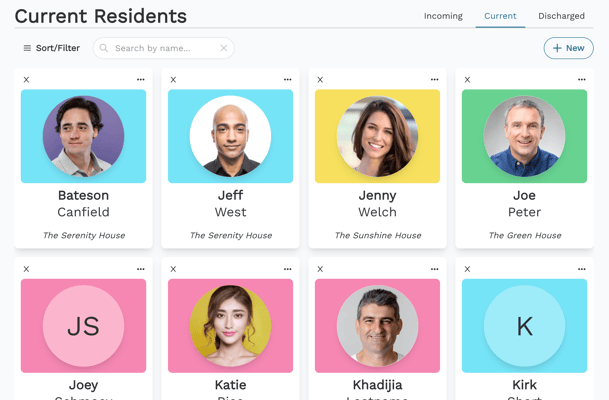
Screenshot 2024-08-27 at 3.26.02 PM
Introducing Sobriety Hub AI

UA & BA Tracking

Track urinalysis and breathalyzer results to monitor physical sobriety. Batch UA results flow automatically into individual resident timelines.

Meeting & Session Attendance

Log attendance at recovery meetings and therapy sessions. Residents can also record their own events through the Resident App.

Medication Management

Track medication schedules, types, and counts to ensure adherence alongside all other resident records.

Legal Info & Court Dates

Track case status, probation and parole details, court dates, and legal requirements so nothing falls through the cracks.

Emergency Contacts

Store contact info for physicians, case managers, counselors, CPS workers, and other key people involved in a resident's care.

Recovery History

Track time in recovery, past stays, treatment history and referral source of resident.

favicon (2)

Shared Timeline

A living record of every interaction

Every note, UA result, meeting attendance, and milestone flows into a shared timeline—giving managers and staff full visibility without digging through files.

  • Residents log events from the Resident App that automatically appear in the shared timeline
  • Batch UA results sync to both house and individual resident timelines
  • Infractions, privileges, and overnight passes are all documented
  • Full history preserved for current, incoming, and discharged residents
option a (16)
Screenshot 2026-02-11 at 10.51.00 AM
favicon (2)

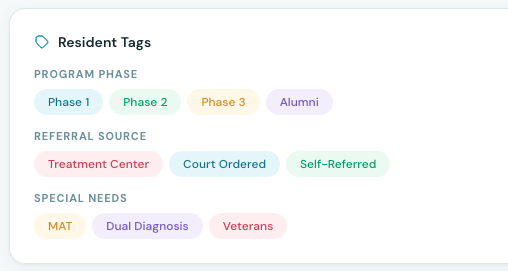
Custom Tags

Tag, filter, and segment your residents

Create custom tags for any resident attribute—referral source, insurance type, program phase, or anything unique to your operation. Use tags to filter, sort, and group residents instantly.

favicon (2)

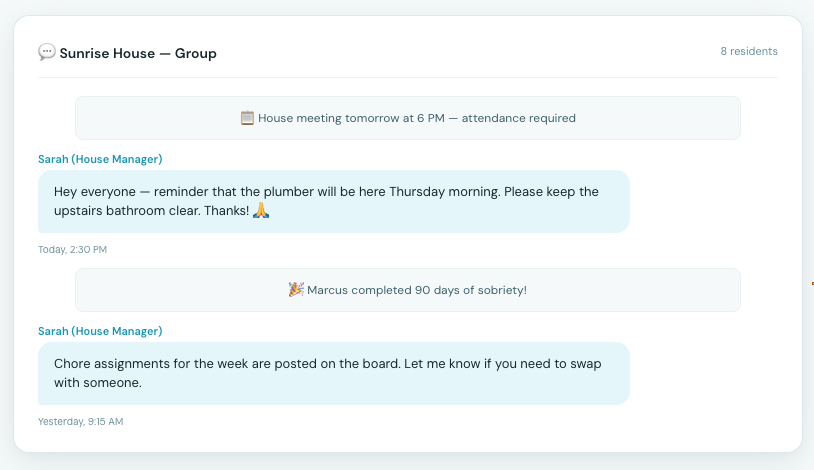
Group Messages

Keep everyone in the loop

Send group messages to residents by house, tag, or status. Share announcements, schedule changes, and reminders without leaving the platform.

More on the Resident App
Screenshot 2026-02-11 at 10.52.32 AM

Resident Management

Prospective residents fill out a customizable online application form that automatically creates a resident profile in Sobriety Hub. From there, staff can review the application, decline it, hold a bed with a desired move-in date, or move the resident directly into a house. The application form can be embedded on your website with your branding and shows real-time bed availability across all houses.
Staff log UA and breathalyzer results directly to a resident's timeline as events. You can attach a photo of the test, select the result (positive/negative), and note the specific substance. Each entry is date- and time-stamped with the recording staff member's name. For batch testing, a house-level event log lets you record multiple residents' results at once.
Yes. You can track phases using custom tags on resident profiles or through a dedicated phase field. Tags are filterable, so you can quickly view all residents in a given phase. If your phases correspond to different houses, residents automatically move into the correct context when transferred. Phase data also feeds into the Insights module for outcome reporting.
Resident data is retained for as long as your account is active. Discharged resident records, timelines, form submissions, and payment history remain fully accessible and searchable. This ensures you have a complete historical record for compliance audits, alumni re-engagement, or outcome reporting at any time.
Discharged residents move to a dedicated section where all their records — timeline, forms, payments, and profile data — are preserved. You can query discharged residents using AI search, for example asking 'show me residents who discharged sober with program complete.' This supports alumni re-engagement, compliance reporting, and readmission workflows.
Sobriety Hub captures sober status upon discharge, program completion status (complete or incomplete), whether discharge was with or against staff advice, returnability to the program, and discharge date with notes. All discharge data feeds into the Insights module for outcome reporting and can be queried using the AI search tool for alumni re-engagement.
Each resident has a chronological timeline that logs all events: staff-reported entries like UAs, breathalyzers, bed checks, and program notes, as well as resident self-reported actions like meeting attendance and mood check-ins. Every entry is date/time-stamped with the author and device used. The timeline serves as the resident's complete record within the program.
Yes. An integrated AI search lets you query your resident data in natural language for auditing and compliance. For example, you can ask 'show me residents who haven't had a UA in the last seven days' or 'show me residents on controlled substances.' The tool returns matching residents instantly, saving significant time during compliance reviews.
Residents can record events like meeting attendance and milestones from the mobile app. These entries appear in the shared timeline alongside staff-logged activity, giving you a unified view of all resident events regardless of who recorded them or from which device.


Ready to simplify resident management?

See how Sobriety Hub helps recovery housing operators save time, improve outcomes, and grow with confidence.